

软件介绍
今天的软件分享是HiBit Uninstaller,该软件是5ilr绿软最新搜集整理的一款系统应用软件完全卸载工具,即使不自带卸载程序的也可强力卸载电脑软件。
关于电脑怎么强制卸载软件?小编之前也介绍过几款自带扫描跟踪功能的卸载工具,比如Soft Organizer和IObit Uninstaller还有Reg Organizer 都可以强力卸载电脑软件。
那么今天介绍的HiBit Uninstaller具有Windows内置卸载程序的类似的界面,非常便于上手操作。面对一些正常方式无法卸载的程序,可以使用「强制卸载」工具分析扫描彻底清除所有文件以及注册表项目。
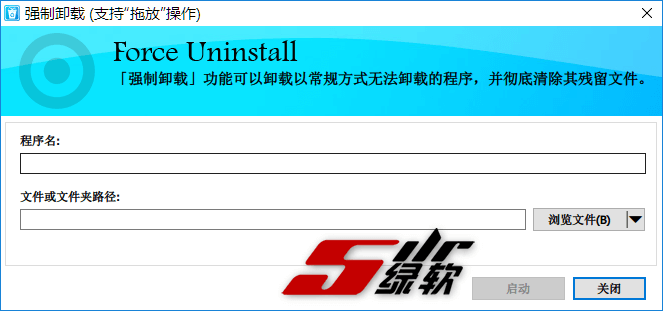
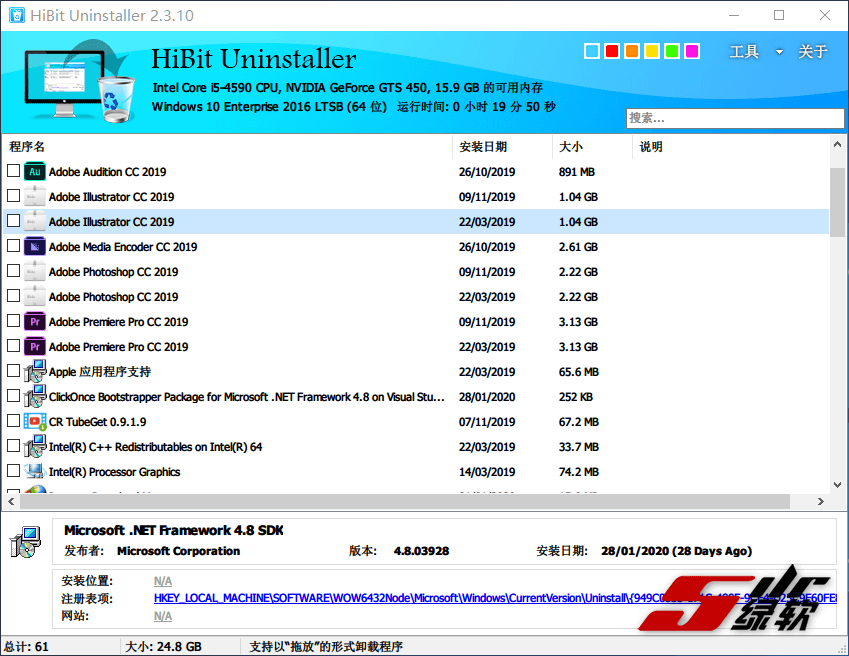
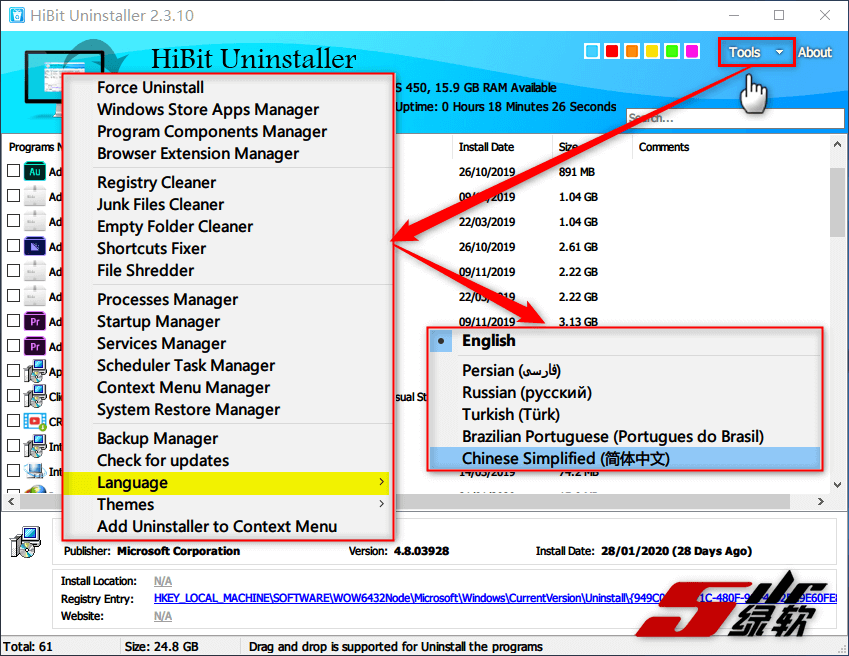
HiBit Uninstaller除了卸载功能还内置很多辅助卸载系统优化的小工具,比如:Windows应用商店应用管理器,程序组件管理器,浏览器扩展管理器,注册表清理程序,垃圾文件清理程序,空文件夹清理程序,快捷方式修复程序,文件粉碎程序(F,进程管理器,启动管理器,服务管理器,计划程序任务管理器,上下文菜单管理器,系统还原管理器。
截图预览
简体中文设置步骤:
功能特色
- 完全卸载程序无残留;
- 强制卸载所有顽固的程序软件;
- 一次删除多个程序;
- 支持导出已安装程序Html列表;
- 支持卸载Windows 应用商店应用;
- 支持删除浏览器扩展插件;
- 支持粉碎敏感文件;
- 集成注册表问题修复;
- 支持删除垃圾文件;
- 支持删除无效的快捷方式;
- 支持查找空文件夹;
- 支持管理Windows系统还原点;
- 易于使用的用户界面;
更新内容
hibitsoft.ir/HiBitUninstaller/Changelog.txt
下载地址
HiBit Uninstaller 3.2.70 中文便携版
历史版本
HiBit Uninstaller 3.2.40 中文便携版
HiBit Uninstaller 3.2.10 中文便携版
HiBit Uninstaller 3.1.95 中文便携版
HiBit Uninstaller 3.1.81 中文便携版
HiBit Uninstaller 3.0.10 中文便携版
HiBit Uninstaller 2.7.70.100 中文便携版
HiBit Uninstaller 2.7.60 中文便携版
HiBit Uninstaller 2.7.47 中文便携版
HiBit Uninstaller 2.7.45 中文便携版
HiBit Uninstaller 2.7.40 中文绿色版
HiBit Uninstaller 2.7.30 中文绿色版
HiBit Uninstaller 2.7.15 中文便携版
HiBit Uninstaller 2.7.10 中文便携版
HiBit Uninstaller 2.6.20 中文便携版
HiBit Uninstaller 2.6.10 中文便携版
HiBit Uninstaller 2.5.95 中文便携版
HiBit Uninstaller 2.5.90 中文便携版
HiBit Uninstaller 2.5.80 中文便携版
HiBit Uninstaller 2.5.70 中文便携版
HiBit Uninstaller 2.5.60 中文便携版
HiBit Uninstaller 2.5.45 中文便携版
HiBit Uninstaller 2.5.35 中文绿色版
HiBit Uninstaller 2.5.20 中文绿色版
HiBit Uninstaller 2.5.15 中文绿色版
HiBit Uninstaller 2.5.10 中文绿色版
10F
感谢大佬分享!
9F
真的好用
8F
感谢分享。
7F
真的好用!
6F
感谢分享。
5F
感谢大佬分享,等回家试试,在哪里收藏帖子
4F
真那么好用吗?
3F
感谢分享。
2F
真的好用!以前一直用的1.4版本,现在升级用一下这个新版
1F
感谢大佬分享,等回家试试,在哪里收藏帖子